Today and goals
Today is the page Daf opens on, and it answers one question: how much have I read today, and how far am I from the goal. This page goes through it card by card, and then through the goals in Preferences that decide what the ring is measuring.
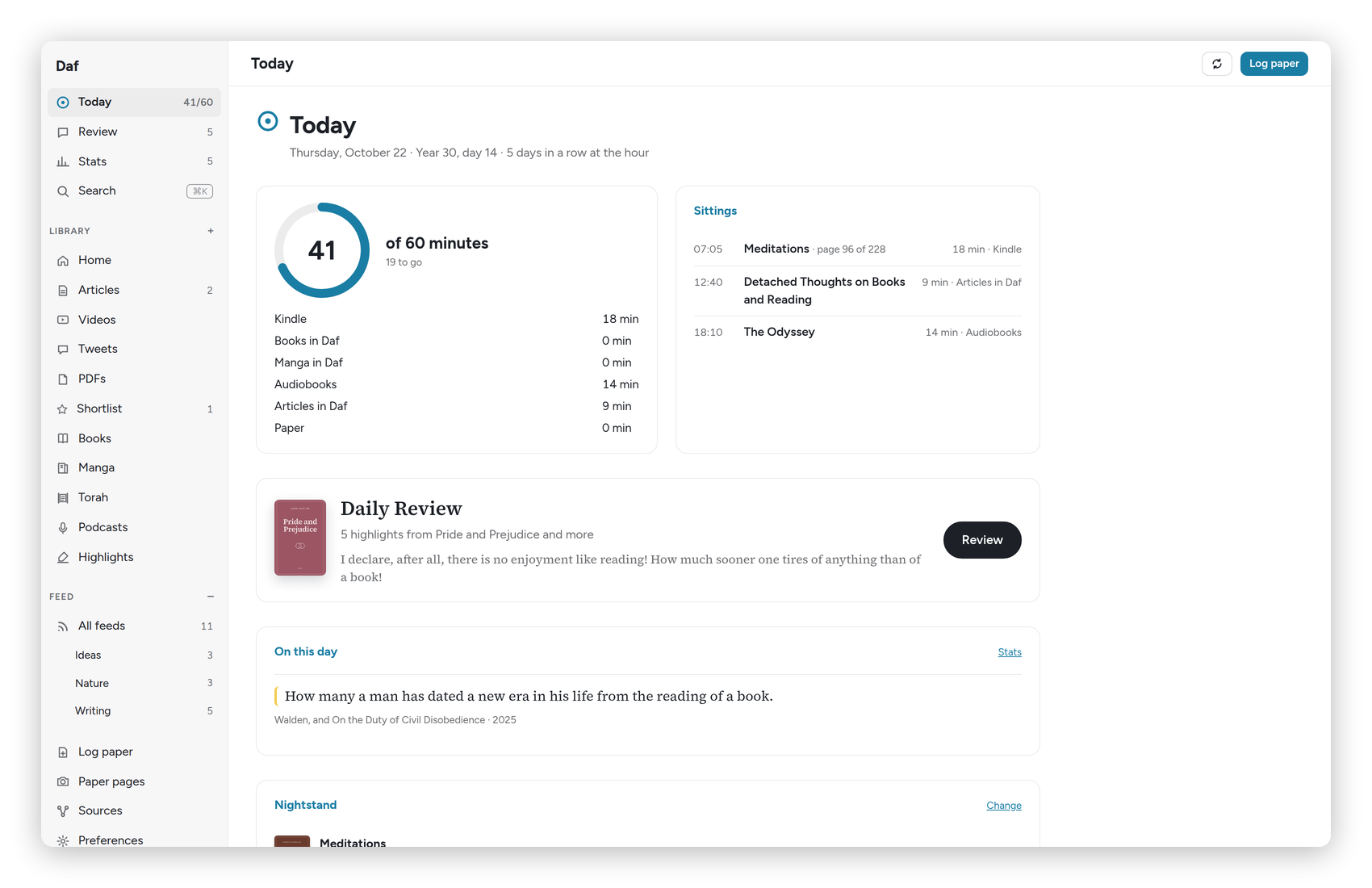 Today, with 41 of 60 minutes read.
The top of the page
Under the title is the date, then "Year 30, day N", then the streak: "5 days in a row reading", or "N days in a row at the hour" once the hour starts happening. The sidebar shows the same numbers next to Today, like "45/60", so you see them from every page.
The sidebar
The sidebar has six places: Today, Review, Library, Books, Feed and Highlights. The little arrow next to Library opens its kinds (Articles, Videos, Tweets, PDFs and my saved views), and the one next to Feed opens its folders. Under them is Pinned, which I choose in Preferences → Sidebar: Podcasts, Manga, Torah, Recovery and Shortlist to start with, and Paper pages and Sources if I want them. At the bottom are Search (⌘K), Stats and Preferences. Anything that isn't pinned is still one ⌘K away.
One button in the top left corner shows and hides it, and it stays in that corner either way. ⌘\ does the same. When it's showing, it's either full, with the names, or mini, a strip of icons: I drag its edge wider for full or narrower for mini, and all the way to the edge to hide it. It never changes size by itself, so turning the tablet round keeps it the way I left it. A touch screen starts with the mini one and a computer with the full one, and each device remembers its own.
When something is open to read, the sidebar is hidden, the way Readwise does it. A swipe in from the left edge brings the mini one over the page for a moment (on Android the system's back swipe can get there first), and pulling it further brings the full one.
At the top right, the round arrow syncs every source now instead of waiting for the next five-minute pass, and Log paper opens the dialog for minutes read in a paper book (see Paper books).
A few notices show up above the cards only when they matter:
- On Friday, "Shabbat is coming", with a reminder that the parasha is on the Torah shelf and that paper minutes can be logged after havdalah.
- When the Kindle reaches the end of a book: "You reached the end of … on the Kindle. Mark it read on Hardcover?", with Mark it read and Not yet.
- When you've been reading a book that isn't on your nightstand: Swap it in puts it there, and Just browsing tells Daf to leave it alone.
The ring
The big card is the ring: today's minutes "of 60 minutes", with "15 to go" under it, or "That's the hour." once you're there. Under the ring is every source with its minutes today: Kindle, Books in Daf, Manga in Daf, Audiobooks, Articles in Daf and Paper, plus Videos and Podcasts on a day they have minutes. A source you've switched off in Preferences still shows, marked "not counted", so you can see the time without it going into the ring.
Beside it, Sittings lists each stretch of reading with its time, its book and page, how long it was and where it happened. Kindle reading shows up when the Kindle sleeps or closes a book, and audiobooks every five minutes.
The rest of the page
- Daily Review: today's highlights, how many there are, and the first one. Review starts it, and once you're done it says so, with the review streak. More in Highlights and review.
- On this day: highlights you made on this date in earlier years, when there are any, with a link to Stats.
- Nightstand: the three books you're reading now, with their progress on the Kindle, in Daf and in the audiobook. Change picks different ones.
- This week: a bar for each day, with the minutes over it.
- Year 30: the year as a grid of 365 squares, darker the more you read, from "none" to "an hour or more", with the hours so far, days read, days at the hour and days in.
- Year 29: the year before, the same way, so you can see what you're up against.
At the very bottom, a line says how fresh the sources are, for example "Kindle: newest page 12 h ago (Daf plugin) · Audiobookshelf checked 6 min ago". If a number looks wrong, that line usually explains why.
Goals
The goals live in Preferences, at the top. There are three presets to start from:
- Gentle: half an hour a day, five days a week.
- Year 30: an hour a day, and two books a month.
- Deep: an hour and a half a day, three books a month.
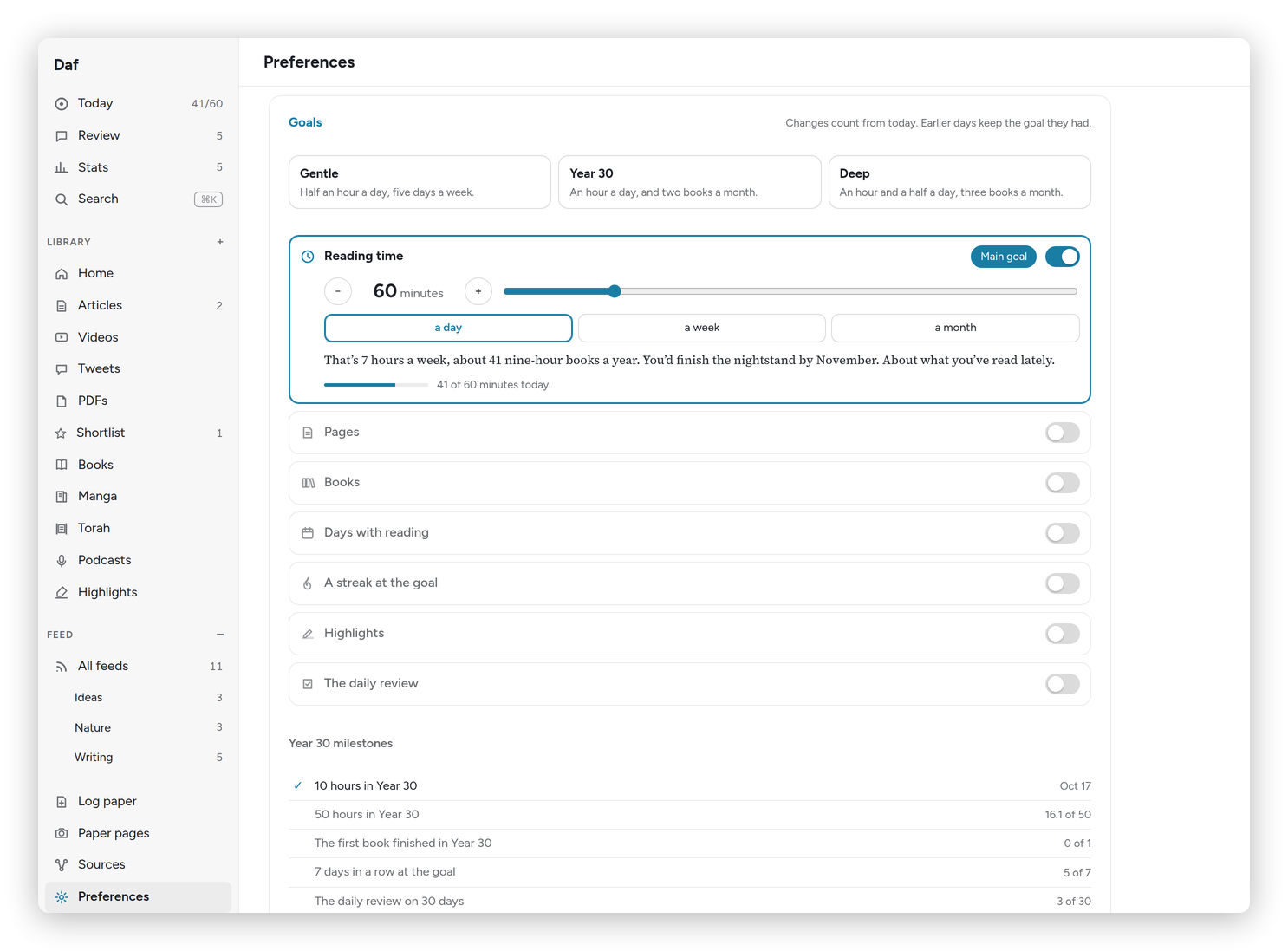 Preferences → Goals, with the Year 30 preset.
Under them is one card per kind of goal, each with its own switch: Reading time (a day, a week or a month), Pages (a day or a week), Books (in Year 30, a year, or by 35), Days with reading, A streak at the goal, Highlights and The daily review. Use − and + or the slider to set the number. Each card says in a sentence what the goal means in practice, like "That's 7 hours a week, about 41 nine-hour books a year", and how you've been doing lately, so you can tell a stretch from a fantasy.
Make main picks the goal that drives the ring on Today, the widget and the Kindle. For most people that's reading time.
A few details worth knowing:
- A change counts from today. Earlier days keep the goal they had, so raising the goal never ruins last month's streak.
- Pages come from Kindle page turns of five seconds or more (each page once a day), pages shown in Daf's book reader, and the pages you type when you log paper.
- Books count when Hardcover has a read date or Daf's reader passes 97%. Manga volumes only count if you tick "Manga and comic volumes count as books".
- Year 30 milestones under the goals, like "10 hours in Year 30" and "The first book finished in Year 30", get a small celebration the first time you reach them, once on each device.
Days start and end in your Home time zone (Preferences → Days), which matters if you travel: switch it when you land, and the hour belongs to the right day.
If you only change one thing, choose a preset and leave the rest alone for a week.