Highlights and review
This page is about the part of Daf I'd miss most if it disappeared: every highlight in one place, and a few of them coming back every day. It covers making highlights, the Highlights page, the daily review, flashcards, and where it all ends up in the vault.
Where highlights come from
- The Kindle, from KOReader's notes for each book, which reach the server with the books.
- Daf itself, in books, articles, PDFs and video transcripts.
- The browser extension, on any web page.
- Karakeep, when you highlight in its own reader.
- Audiobooks and podcasts, transcribed from a bookmark or a shared position.
- Paper pages, from photos of the lines you marked in pencil.
- Readwise, the years before Daf, read from the Readwise exports in my vault.
Making a highlight
With a mouse, selecting more than one word highlights it right away, like Readwise, and selections grow to whole words. Hold Alt (⌥ on a Mac) to select without highlighting. On a touch screen, or when Auto highlight is off, a small bar comes up instead with Highlight (h), Highlight with a note (n), Ask about this and Copy, and Define or Translate when you've selected a single word or a Hebrew phrase.
Once it's a highlight, the bar changes: the colored circle removes it (with Undo for a few seconds), then Add a note, Tag it, the five colors (yellow, green, blue, pink and purple), and … for Copy text, Share as image, View in notebook, Favorite and Make a flashcard. A Kindle highlight shows "Kindle" where the remove button is, because it belongs to the Kindle.
On a phone the bar keeps clear of the selection handles, so a tap on it never lands on a handle instead. In the Android app it's the only menu, since Android's own Copy and Select all bar stays away while a book or article is open, and it sits over the words. In a phone's browser, whose own menu takes that spot, it sits well under them. A tap anywhere on the page puts the bar away and does only that, so it doesn't turn the page too.
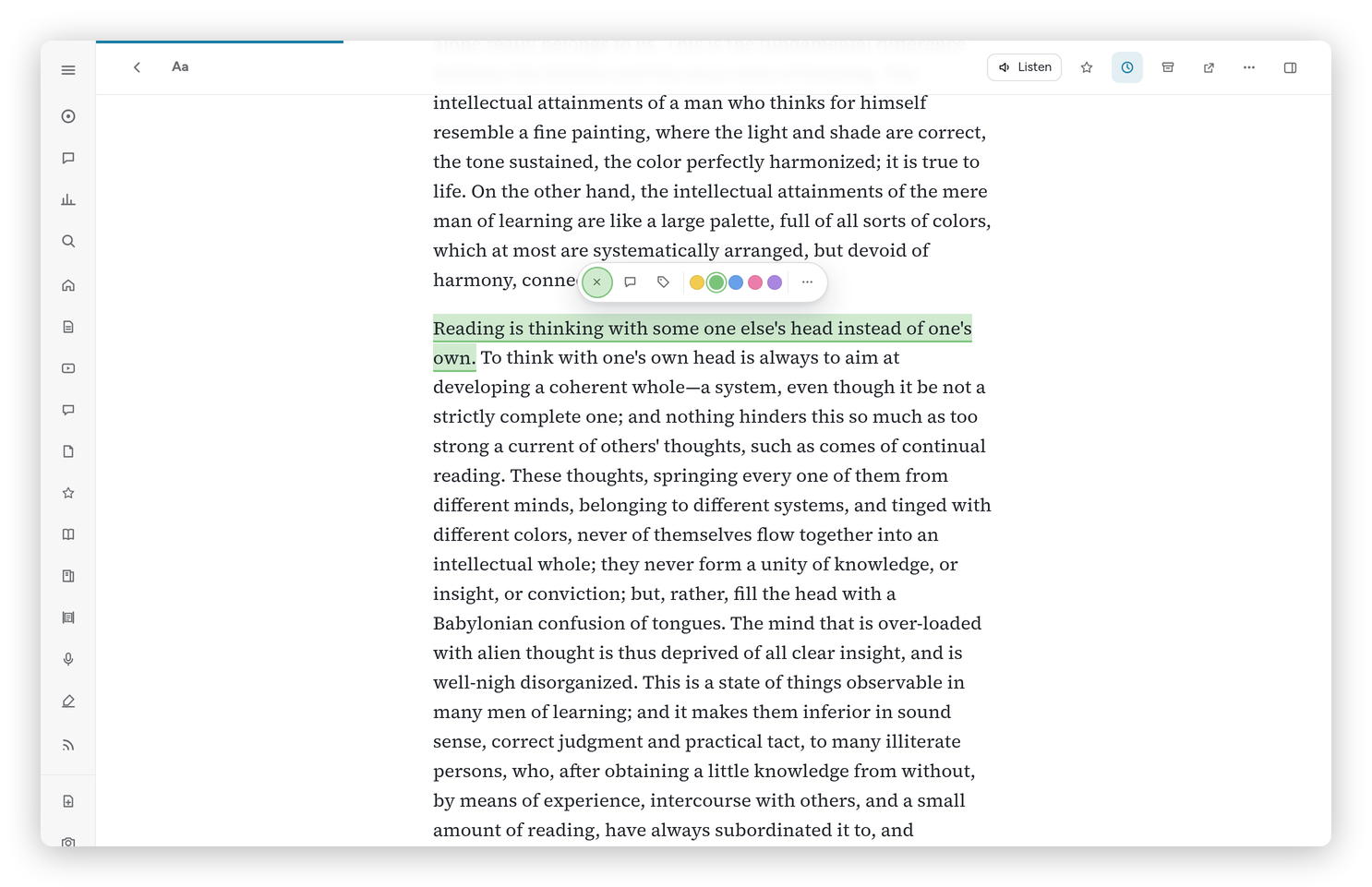 A sentence just highlighted, with the colors above it.
A word with a dot in a note becomes a tag, as in Readwise: ".craft" in a note tags the highlight "craft". Highlighting over an existing highlight merges them, and the note, tags and review history come along.
Open at the exact spot
Every highlight opens where it is. Press the small arrow next to a highlight on the Highlights page or a book page, click it in the Notebook, or press o in the review, and the book or article opens at that line, and the spot flashes. That works for the Kindle's highlights in books Calibre has, for Daf's own, and for audiobook and paper highlights, which Daf finds by their words.
The Highlights page
Highlights in the sidebar shows them all, grouped by book or article. At the top:
- a search box for the text, notes, tags and titles;
- source chips: All, Kindle, Made in Daf, Articles, Audiobooks, Paper and Readwise;
- the five colors, Favorites, and the order (newest, by book in reading order, or oldest);
- Review these, which turns whatever the filters show into a review of its own;
- Export: Markdown, by book, CSV (spreadsheet) or JSON of what the filters show, and Flashcards for Anki.
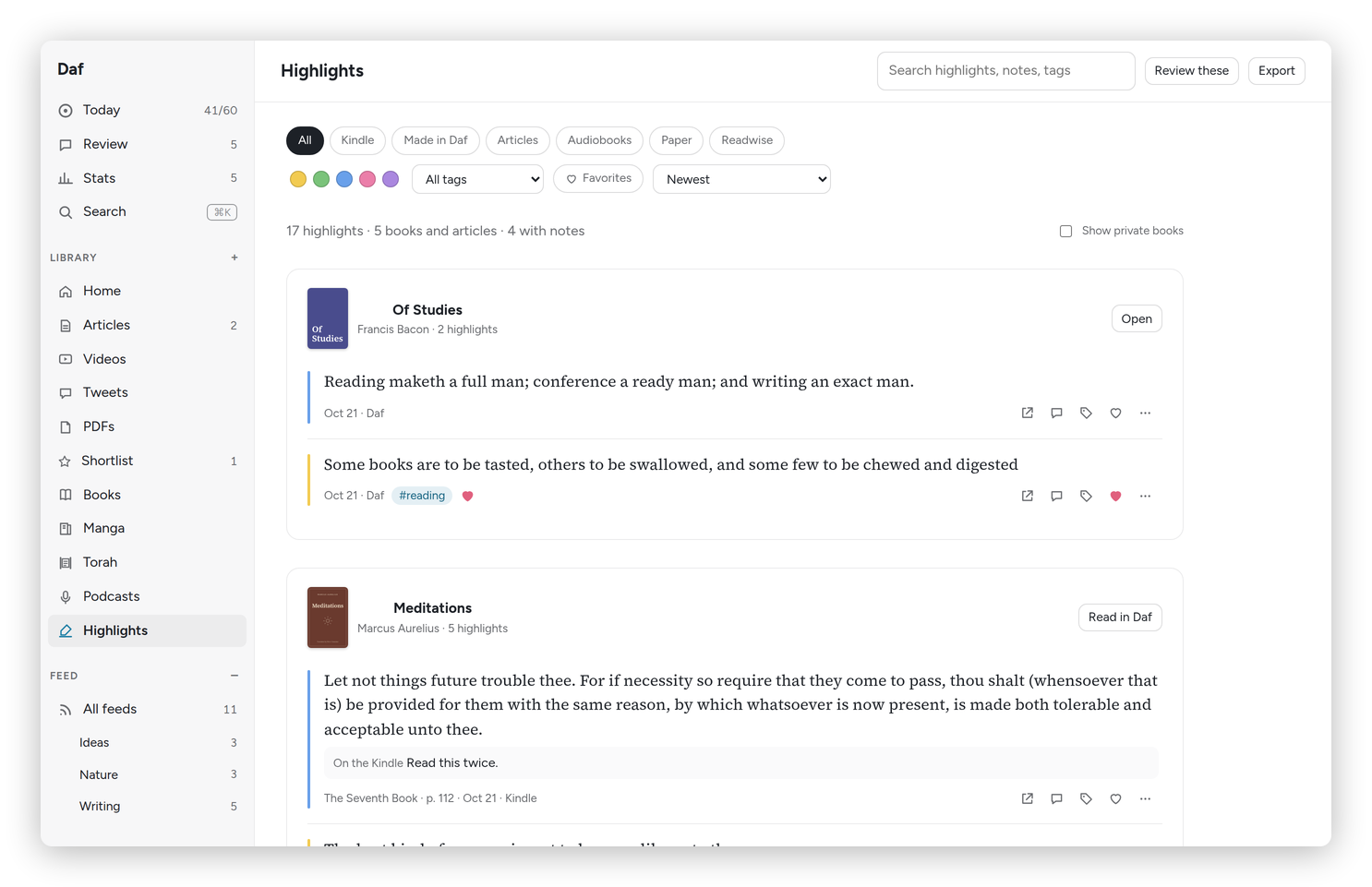 The Highlights page, with the color and source filters.
Each highlight's … has the colors, Make a flashcard, Copy text, Share as image, Open at this spot and Never show in review, and for a highlight made in Daf (in a book, an article or a paper page) Delete highlight. A picture has no Share as image or flashcard.
The daily review
Review shows today's highlights one at a time, five a day unless you change it in Preferences → Daily review. Daf picks the ones that are due first, then new ones, leaning toward the books on your nightstand and what you highlighted lately, with at most two from one book. Favorites come up twice as often, and private books never.
For each one:
- Keep (k or →): it comes back in four days, then each time two and a half times later.
- Less (l): it goes away for four months or more.
- Never (x): out of the review for good. "Back into review" undoes it.
- n writes a note, o opens it at its spot, and f makes it a favorite.
On a phone, swipe right to keep and left for less often. A note you write goes into the vault under that highlight. When you're done, Daf says so, with your review streak, and Review more highlights gives you another round.
A book's page can make its highlights come up More, As usual, Less or Never, and there are themed reviews too, of one tag, one color, your favorites or one book.
The first highlight of the day also comes to my phone every morning, through my Signal bot, and a reply that starts with "n:" becomes its note (see Sharing, messages and the widget).
Flashcards
Some highlights are facts I want to actually remember, and for those there are flashcards, like Readwise's Mastery. Make a flashcard gives you Fill in the blank (tap the words to hide) or Question and Answer, and Suggest a card asks Claude to write one for you. Due cards come after the day's highlights in the review: Space shows the answer, then 1 Again, 2 Hard, 3 Good or 4 Easy, and the interval grows like Anki's. Up to five new cards come in a day.
Share as image
Share as image makes a card of the quote beside its color, with the title and author, for sending to someone. Share… opens the system's share sheet where there is one, and Download saves the picture.
Into the vault
Daf writes highlights and notes into my Obsidian vault, which is the real record. A book's highlights go into its note, between two markers that are Daf's alone. If I edit that part in Obsidian, my edit wins. Basically, Daf is the reading room and the vault is the library, and none of my highlights or notes live only in Daf.
Anything else I highlight or write a note on gets a note of its own, the way Readwise's Obsidian export does it: an article from the Feed or the Library, something I imported, a tweet, a PDF, a YouTube video, a podcast episode, an Instagram reel or a Torah reading. Articles, tweets and PDFs go to Reference/clippings, videos to Reference/youtube, reels to Reference/instagram, podcasts to Reference/podcasts and the parasha to Reference/torah.
Each note has:
- The properties my clippings use: the title, the author as a link, the original address, a
daflink that opens it in Daf, the site, the kind of thing it is ("article", "video", "podcast", "reel", "tweet", "pdf" or "torah"), when it was published and when I saved it, the word count, the cover for a video, andcategoriesso it shows up in my Clippings, YouTube Clippings or Podcast episodes views. It's marked#ai-assisted-notelike everything a script writes. - My note on the whole thing, if I wrote one.
- My highlights, each with its note and tags, and a link to its place in the text (for a video, the link is the time).
- The FULL text: headings, lists, quotes, links and pictures (from the web, nothing downloaded), with the words I highlighted marked in yellow. A video or a reel gets its transcript with the times, and a YouTube time opens the video right there. A podcast episode gets its show notes, and the minutes I clipped are its highlights. A Torah reading has the Hebrew and the English, verse by verse. A very long text (over about 150,000 characters) stops there, keeping only the paragraphs I highlighted after that point, with a link to the rest in Daf.
All of that sits between Daf's two markers, so it stays up to date as I highlight more, and whatever I write above or below them is mine and stays as it is. A note I edit there, on a highlight or on the whole thing, goes back into Daf. A transcript or a full page that arrives later (a video's captions, say) fills in the note by itself.
Notes that weren't made by Daf only get the highlights, never the text. That covers my Readwise clippings, the Karakeep notes from before Daf kept the Library (in Reference/karakeep, which already have the text), and the Torah essays in my vault that I read in Daf.