Your to-dos as Markdown
Your to-dos in Dvarim are a folder of ordinary Markdown files, and this page is what's in that folder, in plain words. The full specification, marker by marker, is The file format. The short version is that you could read and edit all of it in any text editor, and Obsidian reads it as notes with tasks in them, because the format is the Obsidian Tasks plugin's own, with a few extra markers of Dvarim's own for what the plugin has no word for, like This Evening and Someday.
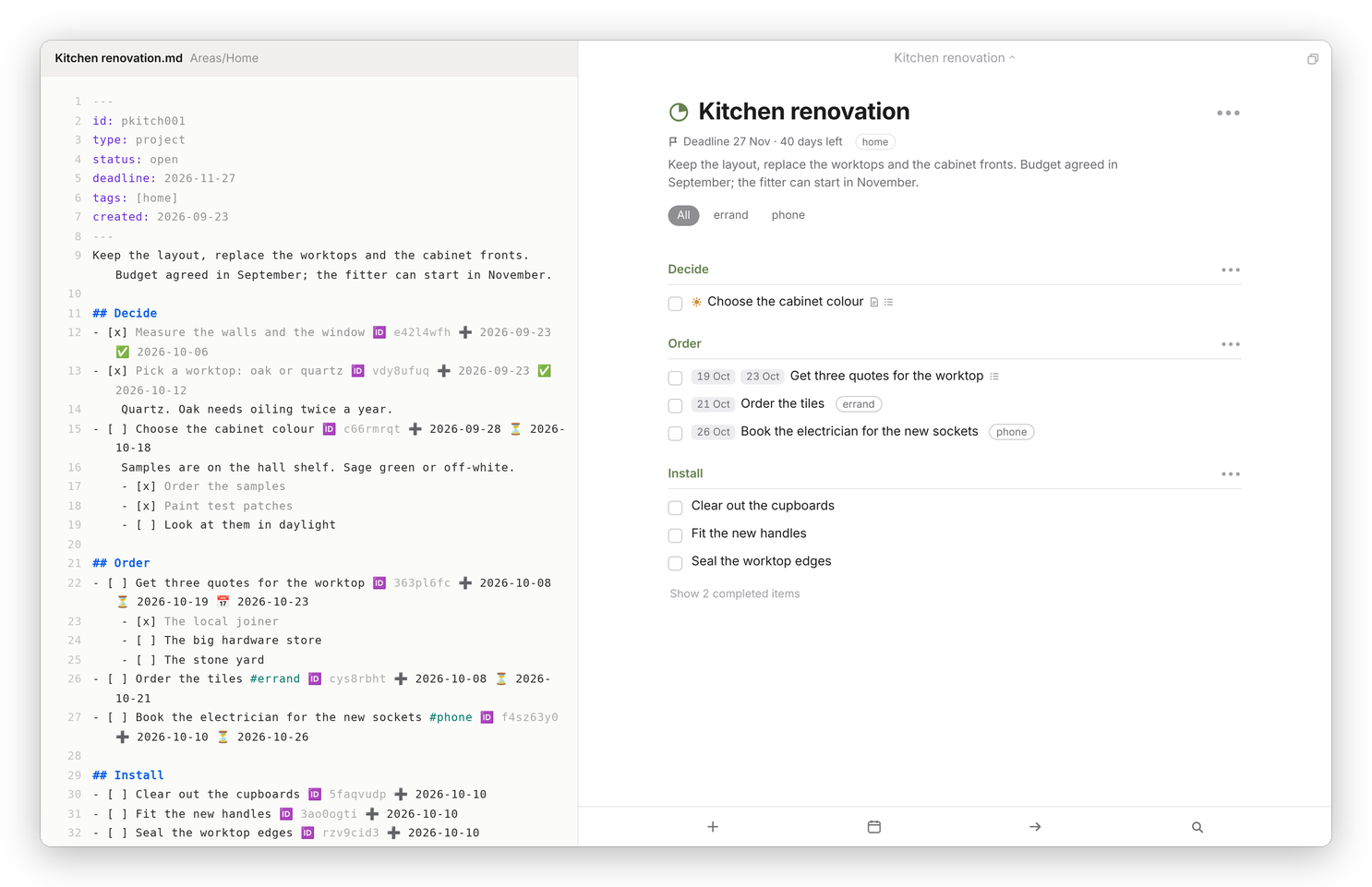 The same project twice: on the left the file as it is on disk, on the right what Dvarim makes of it.
The folder
Tasks/
  Inbox.md                  the Inbox
  Standalone.md             to-dos with no area and no project
  Trash.md                  deleted to-dos, until you empty the Trash
  Areas/
    Home/                   an area is a folder
      Home.md               the area's own note: its notes, its tags, its loose to-dos
      Kitchen renovation.md a project in the area
    Work/
      Work.md
      Quarterly report.md
  Projects/
    Plan the trip to the coast.md    a project with no area
  Trash/                    deleted projects, whole
  .dvarim/                  the app's own small files (below)
The names are the names: rename a project's file in Obsidian or in Finder and the project is renamed in the app, and move it into another area's folder and it's in that area. A to-do keeps its identity through all of that, because it carries an id of its own.
A project file
A project is a note with a few lines of front matter at the top, then its notes, then its to-dos, with a ## line for each heading:
---
id: pkitch001
type: project
status: open
deadline: 2026-11-20
tags: [home]
---
Keep the layout, replace the worktops and the cabinet fronts.

## Decide
- [x] Pick a worktop: oak or quartz 🆔 vdy8ufuq ✅ 2026-10-05
- [ ] Choose the cabinet colour 🆔 c66rmrqt ⏳ 2026-10-11
    Samples are on the hall shelf. Sage green or off-white.
    - [x] Order the samples
    - [ ] Look at them in daylight

## Order
- [ ] Order the tiles #errand 🆔 cys8rbht ⏳ 2026-10-14
Lines indented under a to-do belong to it: plain lines are its notes, and indented boxes are its checklist. Any other keys you or Obsidian put in the front matter are left exactly as they were.
What the markers mean
| On the line | In the app |
|---|---|
- [ ], - [x], - [-] |
open, completed, canceled |
#errand, #home/garden |
tags, and nested tags |
⏳ 2026-10-14 |
When: the day it shows up in Today |
📅 2026-10-16 |
Deadline |
🌙 |
This Evening |
💤 |
Someday |
⏰ 15:00 |
a reminder at that time on the When day |
🔁 every week on Sunday |
repeats (see Repeating to-dos) |
🆔 c66rmrqt |
the to-do's id |
➕, ✅, ❌ and a date |
when it was made, completed, canceled |
A box with [/] in it, which other Tasks tools use for "in progress", is an open to-do too, and Dvarim keeps the [/] until you tick it.
The id on every line
Every to-do the app writes gets a 🆔 with eight letters and numbers. It's how Dvarim knows a to-do is the same one after you've renamed it, moved it to another file, or changed it on two devices at once, and it's what lets sync merge two versions of a file to-do by to-do. If you type a new to-do in Obsidian without one, Dvarim gives it an id the next time it writes that file, or after the file has been quiet for two minutes.
What isn't in the files
A few things have no place in a note: the order you've dragged Today, Anytime and the days of Upcoming into, the headings you've made in Today, which areas are collapsed in the sidebar, and your settings. Those live in .dvarim/state.json beside the files, and the times they were changed in .dvarim/stamps.json, so two devices can agree on which change is newer. When a sync tool leaves a conflict copy, Dvarim merges it back in and keeps the copy in .dvarim/conflicts/ rather than deleting it. Nothing in .dvarim is a to-do, so even losing the whole folder would never cost you one.
Notes in the folder that aren't areas or projects are left alone. Dvarim only reads a note as a project or an area if it's inside Areas/ or Projects/, or says type: project or type: area in its front matter, so ordinary notes can live in the same folder.
Editing the file from the app
You don't need to leave the app to see the real thing. In a project or an area, the ••• menu has Edit the note itself, which opens the file as it is on disk:
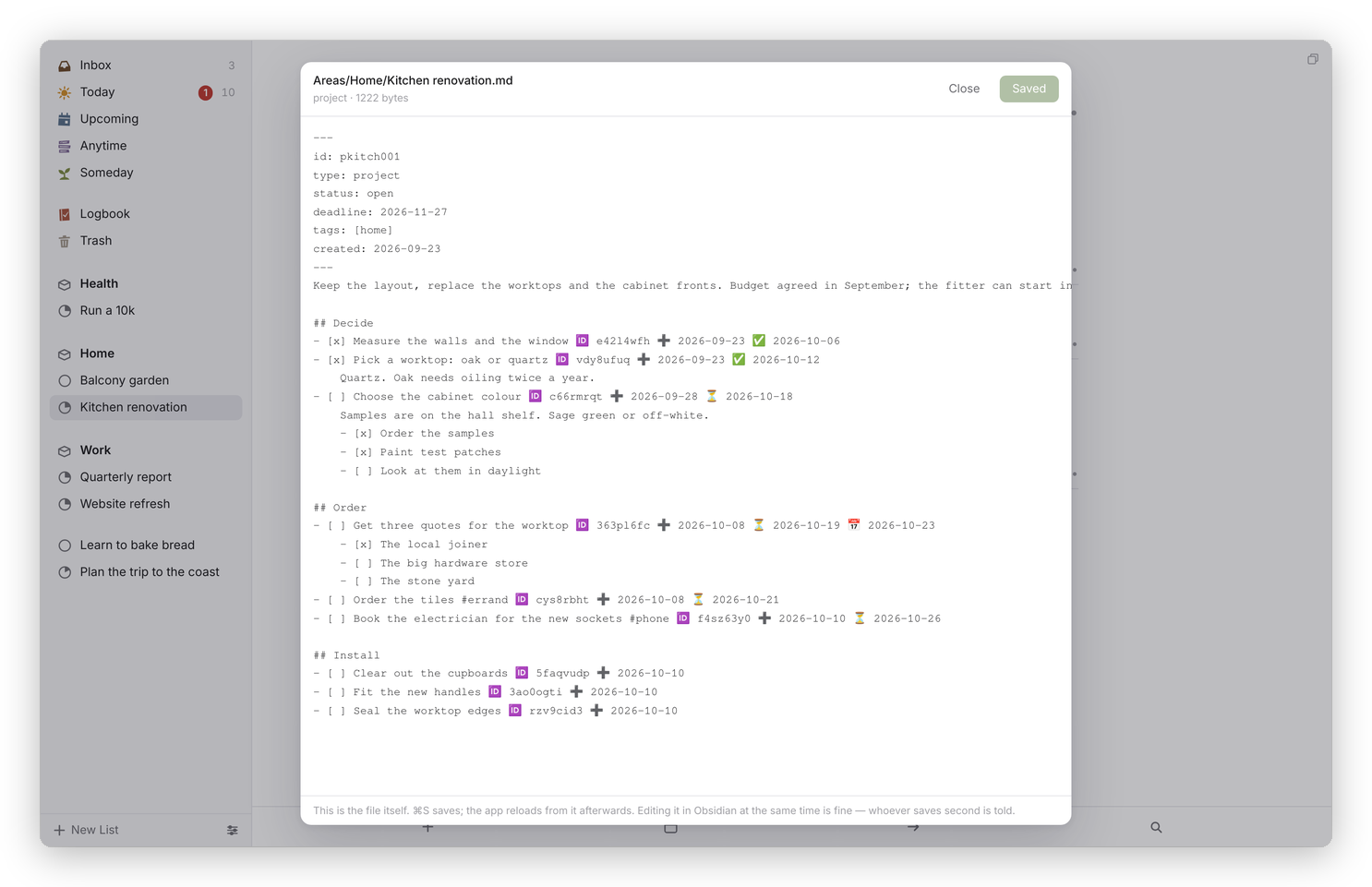 Edit the note itself. ⌘S saves, and the app reads the file again straight after.
Change anything, press Save (or ⌘S), and the app reloads from the file. If the file changed on disk while you were editing, because Obsidian or a sync got there first, Dvarim doesn't overwrite it: it tells you, and you choose Load what is on disk or Overwrite it with mine.