Speaking
Speaking in Binah means Just a Minute, sixty seconds on a topic without hesitation, repetition or deviation, plus the two-minute talk in the monthly benchmark. This page covers how to play it, what the six numbers on the result mean, how the server measures your speech, and what each device needs for the microphone.
Playing Just a Minute
Just a Minute comes up in the last slot of some editions, and it's always in Practice. The screen shows your topic on a card ("Lost property", "Crossword puzzles", "Islands"), a ring that counts down from 1:00, and the three rules under it: No hesitation, No repetition, No deviation. Tap the microphone button to start ("Tap to start. It stops by itself at sixty seconds."), and talk. While you record, the header says "Recording" and the button becomes a stop button: "Stop sends it. Your voice goes only to your Binah server." Let the minute run out, or tap it to stop early and send.
The rules are the radio show's. Hesitation is pausing, or leaning on "um" and "uh". Repetition is using the same word over and over. Deviation is wandering off the topic, or saying something untrue or illogical. You don't need to be clever, only to keep going, on the subject, in some kind of order.
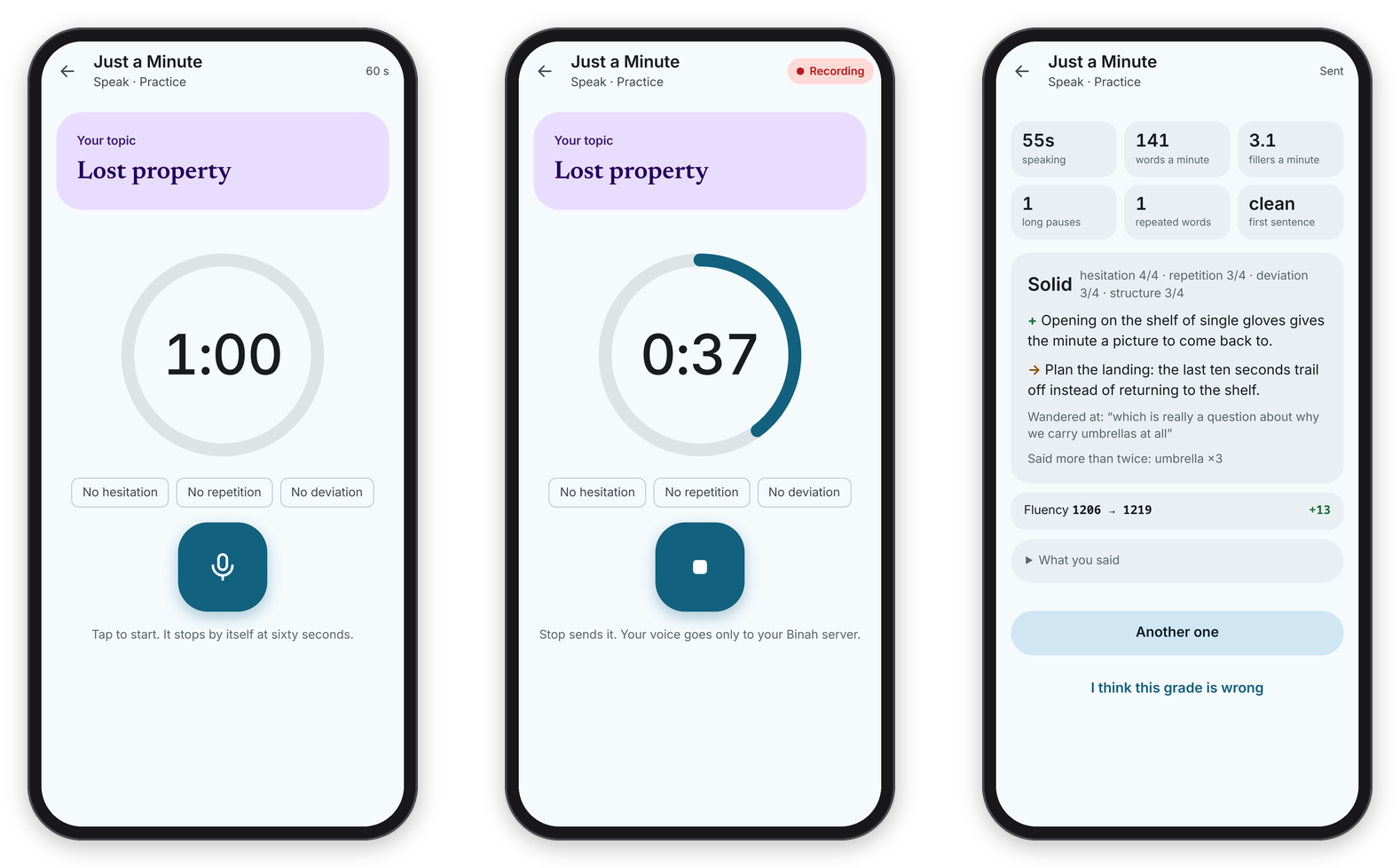 The topic, the minute running, and the result with its six numbers.
When you stop, the recording goes to your server ("Transcribing on the server, then Claude listens for deviation…"), and the result comes back once the server has transcribed it and Claude has read it:
- speaking: how many seconds you actually spent talking, without the pauses.
- words a minute: your pace over the whole recording.
- fillers a minute: "um", "uh", "er", "erm", "ah", "hmm" and "mm", counted over the time from your first word to your last.
- long pauses: silences of a second or more once you've started.
- repeated words: content words you used three times or more, not counting the topic's own words.
- first sentence: "clean" if the first few words came out without a filler, a crutch word like "you know", or a long pause.
Under the numbers are the band, the four scores out of 4 (hesitation, repetition, deviation, structure), one strength, one thing to work on, any phrases where you wandered, and the words you said more than twice. What you said opens the transcript.
How it's scored
Code scores two of the four. Hesitation comes from the long pauses and the fillers a minute, and repetition from the repeated words. If you stop well short of the minute (under 40 seconds of talking), hesitation can't score above 1. Claude judges only the other two, deviation and structure, from the clean transcript and the numbers, and never hears the audio. The score is the four added up, out of 16.
The aim is not zero fillers. Short, well-placed fillers actually help people follow you. What makes speech sound sure of itself is a clean start, few long pauses in the middle of a thought, a steady pace compared with your own usual pace, and not leaning on the same word, and those are the things the numbers watch.
What happens on the server
The recording is transcribed with faster-whisper (the small English model) on the server's own CPU, which takes about seven to ten seconds for a minute of speech. It runs twice: a plain pass for the text that gets graded, and a second pass steered to write down the "um"s and "uh"s that Whisper usually leaves out. That second pass is thrown away if it comes back with noticeably fewer words than the first, because a prompt like that can make Whisper skip a stretch of audio. Pauses come from voice detection (Silero VAD), not from the gaps between Whisper's words, which hide most silences.
The recordings stay in the server's state folder, so a grade can be checked again later. They're never sent anywhere else.
The benchmark talk
The monthly benchmark ends with a two-minute talk on a prompt ("Make one point and support it."), recorded the same way and measured with the same numbers. It's graded once, after you hand in the sitting, and if you can't speak at that moment, Skip the talk this time leaves it out. See The monthly benchmark.
The microphone on each device
A web page can only record on https or on localhost, so on a plain http:// address Just a Minute can't start. Beyond that:
- In a browser, the browser asks the first time. If you said no, allow the microphone for your Binah address in the browser's site settings. If Binah can't get the microphone, it says so: "Binah can't use the microphone. Allow it in the browser or app settings."
- On the Mac, macOS asks once whether Binah may use the microphone, and only Binah's own address gets it, never another site and never the camera. While you record, the Mac doesn't sleep or dim, and closing or quitting asks first.
- On Android, the phone asks once. App settings → Allow the microphone shows whether it's on and asks again. The screen stays on while you record.
Basically, if you can see the ring but nothing happens when you tap, it's the microphone permission or a plain http address, and one of the two settings above fixes it.