Learn: the Road
Learn is Olam's home screen, because learning the game is the whole point. It's a road of 18 short lessons, called stops, that takes you from "What a session looks like" to "Find your players" over about six weeks. It teaches the 2024 rules (SRD 5.2), and it's built for someone who wants to run games one day, not just play.
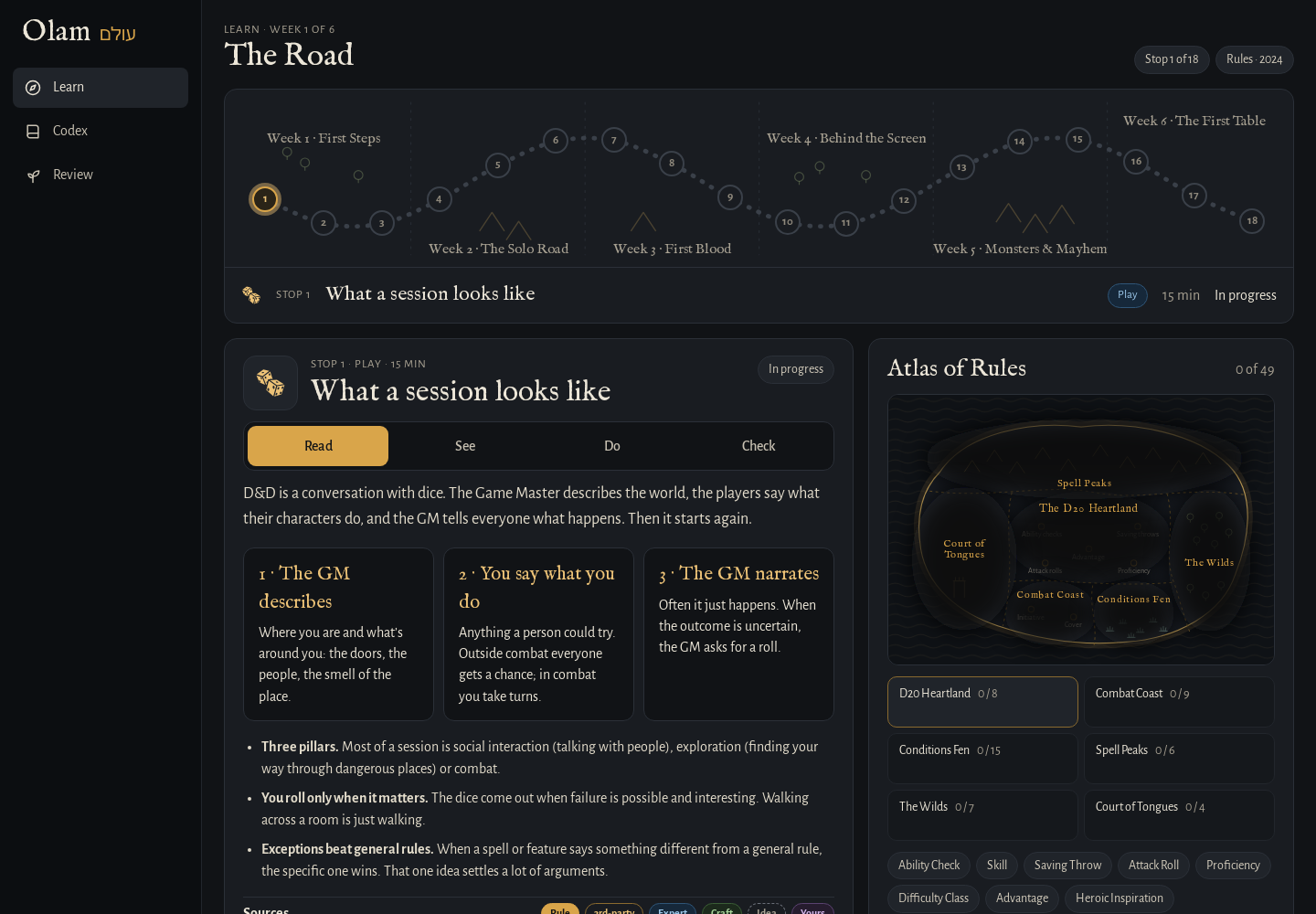 The Road on the left, a lesson in the middle, and the Atlas of Rules.
The Road
The six weeks are First Steps, The Solo Road, First Blood, Behind the Screen, Monsters & Mayhem, and The First Table. Each stop belongs to one of three tracks: Play (being a player at the table), Rules (how the game works), and Run (being the DM).
| Stop | Track | Minutes | |
|---|---|---|---|
| 1 | What a session looks like | Play | 15 |
| 2 | The d20 test | Rules | 20 |
| 3 | Your first character | Play | 45 |
| 4 | A solo adventure with an AI GM | Play | 60 |
| 5 | Checks, saves and attacks | Rules | 25 |
| 6 | Advantage & disadvantage | Rules | 25 |
| 7 | Your turn in a fight | Rules | 30 |
| 8 | Conditions that matter | Rules | 30 |
| 9 | Describe a scene | Run | 30 |
| 10 | Run a conversation | Run | 40 |
| 11 | Improvise: yes, and | Run | 30 |
| 12 | Prep a location | Run | 45 |
| 13 | Build an encounter | Run | 40 |
| 14 | Run a fight | Run | 60 |
| 15 | Spotlight and pacing | Run | 30 |
| 16 | Session zero and safety tools | Run | 30 |
| 17 | A one-shot with an AI party | Run | 90 |
| 18 | Find your players | Play |
The stops open in order. Each one is Done, In progress or Not yet, and the next one opens when you finish the one before it. I did it this way on purpose, because every stop leans on the ones before it.
Right now stops 1 to 6 are full lessons, and stops 7 to 18 are outlines: a short explanation with its sources, and a Mark as read button. They'll become full lessons over time.
The four steps of a lesson
Every full lesson has the same four steps, and you can see which ones you've done at the top of the lesson.
- Read explains the idea in a few lines, with cards and short lists for the parts worth remembering. Under it are the Sources, each with its badge: the rules it comes from, and then things like expert answers about it or homebrew variants. Every rules term in the text is a link, and hovering over one shows what it says.
- See is a worked example, like Tam swinging a shortsword at a prone ghoul, with the dice rolled and the math shown, so you can watch the rule happen before you try it.
- Do is a small exercise you do with your hands. Depending on the stop, you sort things into the right group (is this a check, a save or an attack?), slide an ability score and see what its modifier does to a roll, build a character's ability scores from a class and a background, play a short solo adventure with the AI Game Master, or switch on reasons for advantage and disadvantage and roll.
- Check is three questions. When you answer, it tells you why, and which rule the answer comes from.
A stop is done when you've answered every Check question correctly. If you get one wrong, it goes to Review, so you'll see it again.
Review
Review is every Check question you've missed, with a count next to it in the rail. Answer it right and it goes away; answer it wrong and it stays until you do. It's small on purpose. The research on learning is pretty clear that coming back to what you got wrong is what makes it stick, so I'd open Review at the start of each day before the next stop.
The Atlas of Rules
Beside the Road is the Atlas of Rules, a map of the rules with six regions: the D20 Heartland, Combat Coast, Conditions Fen, Spell Peaks, The Wilds, and the Court of Tongues. It starts covered in fog. Each stop teaches a few rules, and when you finish the stop, those rules clear on the map. Under the map, each region lists its rules, with a ✓ on the ones you know and a dashed outline on the ones the current stop is teaching, so you can see what you're about to learn and where it fits. Every rule there is a link to its wiki page.
Basically, the Road tells you where you are in the course, and the Atlas tells you how much of the game you actually know.
Writing it in your own words
When you finish a stop and you have a vault set up, the lesson shows Write it in your words. It makes a note in your vault, in Learn/, named after the stop (like Learn/06 Advantage & disadvantage.md), with these parts:
- In my own words, for you to explain the idea to yourself.
- What I'm still unsure about, for the questions you want to bring to Ask or to a real table.
- Practice, a dice line for the Dice Roller plugin (like
dice: 2d20kh+5for an attack with advantage), so you can roll it in Obsidian. - Sources, the rules the lesson used.
Olam makes the note once and never overwrites it, so whatever you write there is yours. Open in Obsidian takes you straight to it.
In the demo
The demo has the whole Road, the Atlas and Review. Your progress is kept in your own browser, so it's there next time you open the demo on the same browser, and nobody else sees it. Stop 4's Game Master and the notes in your words aren't in the demo, since there's no AI or vault there.
Next step
When a rule in a lesson makes you curious, the next page, The Codex and wiki pages, is where you go to dig in.