What is Chataltul?
Chataltul is a focus timer that checks in on you while you work. The name is Hebrew (חתלתול) for kitten, the one that grows up in the ring while you work. It used to be called Kavana (כוונה), Hebrew for intention, the attention you bring to what you're doing, and that part hasn't changed. You pick how long (and, if you like, give it a title), and every so often it asks "Still on it?" If you drifted, you say so, and you're back on it a minute later instead of at the end of the hour.
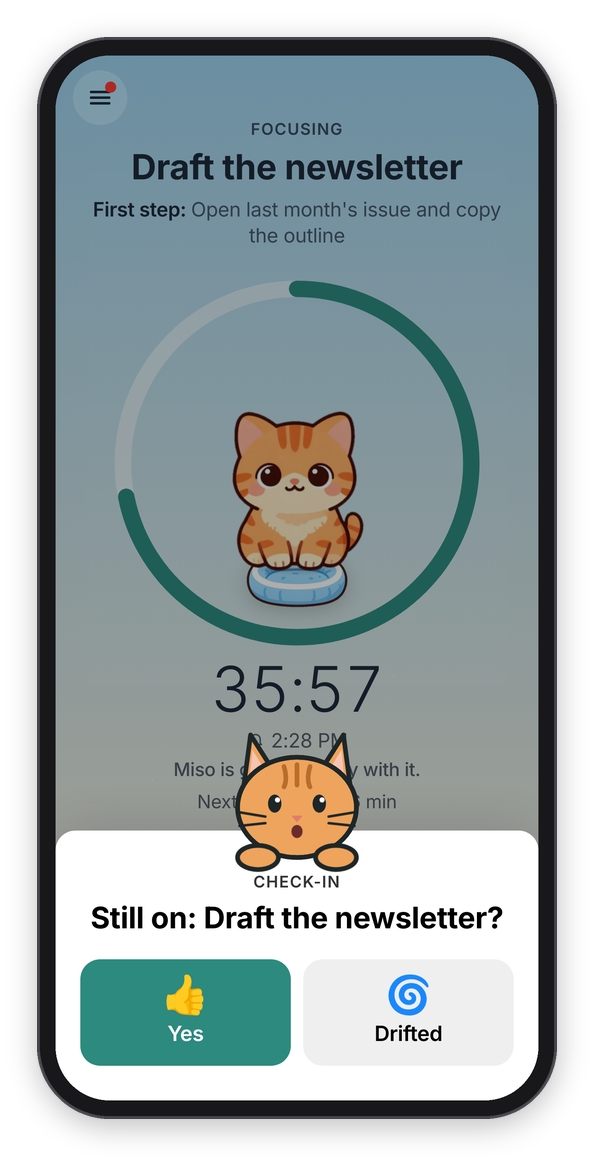
A check-in, with Cat mode on.
The idea: notice the drift, not just the time
Most focus timers count down and ring at the end. That tells you the time is up, but not that you left the work twenty minutes ago for your phone, which is the part I wanted help with. So Chataltul checks in during the block, in one of two ways you pick for each block:
- "Ask me" asks "Still on: Draft the newsletter?" every 15 minutes, or however often you set it. You tap Yes or Drifted, and after Drifted it asks "What pulled you away?" (Phone, Messages, Email, The web, Thoughts, Someone, Tired, Hungry, Other).
- "Nudge me" doesn't ask anything. It sends a short line, like "One thing at a time." or a quote, at an uneven gap, so it doesn't feel like a metronome.
The check-ins come as notifications, so they reach you even when Chataltul is closed, and at the end of the block it asks "How did it go?" and keeps a log. Basically, it's a timer with a friend sitting next to it who taps you on the shoulder now and then.
What it does
- A block: what you're working on, an optional first step, and a timer (5, 25 or 50 minutes or your own number) or a stopwatch that counts up. You can cancel in the first 10 seconds, pause for up to 5 minutes, and keep counting past the end. See A focus block.
- While it runs: a ring that empties like the Clock app's timer with a kitten growing up inside it, pause, park a thought on your Later list, background sound (a purring cat among them), keep the screen on, and a disk timer.
- Check-ins: "Still on it?" as a card over the block, or a short line, and as notifications when the app is closed. See Check-ins and Cat mode.
- Cats, like Forest: the kitten you invite grows up while you focus and comes home to your Cat Café if you stay to the end. Stop early or leave Chataltul and it wanders off. Sixteen cats, eight you meet by focusing and the rest you adopt with the 🐟 treats you earn, which also buy furniture, café themes and sounds, and sponsor shelter cats. Missions, a monthly challenge and 27 achievements pay extra. See Cats.
- The Café: the cats that came home by day, week, month or year, your focus time by tag and by hour, every block with its note, and your habits: a daily goal, a five-week heatmap, and a daily "Time to focus?" reminder. Share it as a picture. See The Café, goal and the daily reminder.
- Around it: breaks with a "Break's over" ping, a mindful minute of breathing, and a What's new page.
- Focus with friends, with an account: see when a friend is focusing, nap together (with friends, or anyone with a room code), and weekly rankings with friends and worldwide if you want. See Focus with friends.
Finding your way around
Chataltul gets around the way Forest does. The Focus tab is the whole first screen: the café wall, the window with your cat in it, and one button. Everything else is in the menu, the button at the top left, which slides in from the side: Focus, Café, Cats, Goals, Shop, Later, Rankings, Friends, A mindful minute, Shelter cats, What's new and Settings, with today's minutes and your days in a row on top. Under that, the lists, sheets and alerts are still dressed like an app from Apple, on purpose, so it feels at home on an iPhone, an iPad or a Mac.
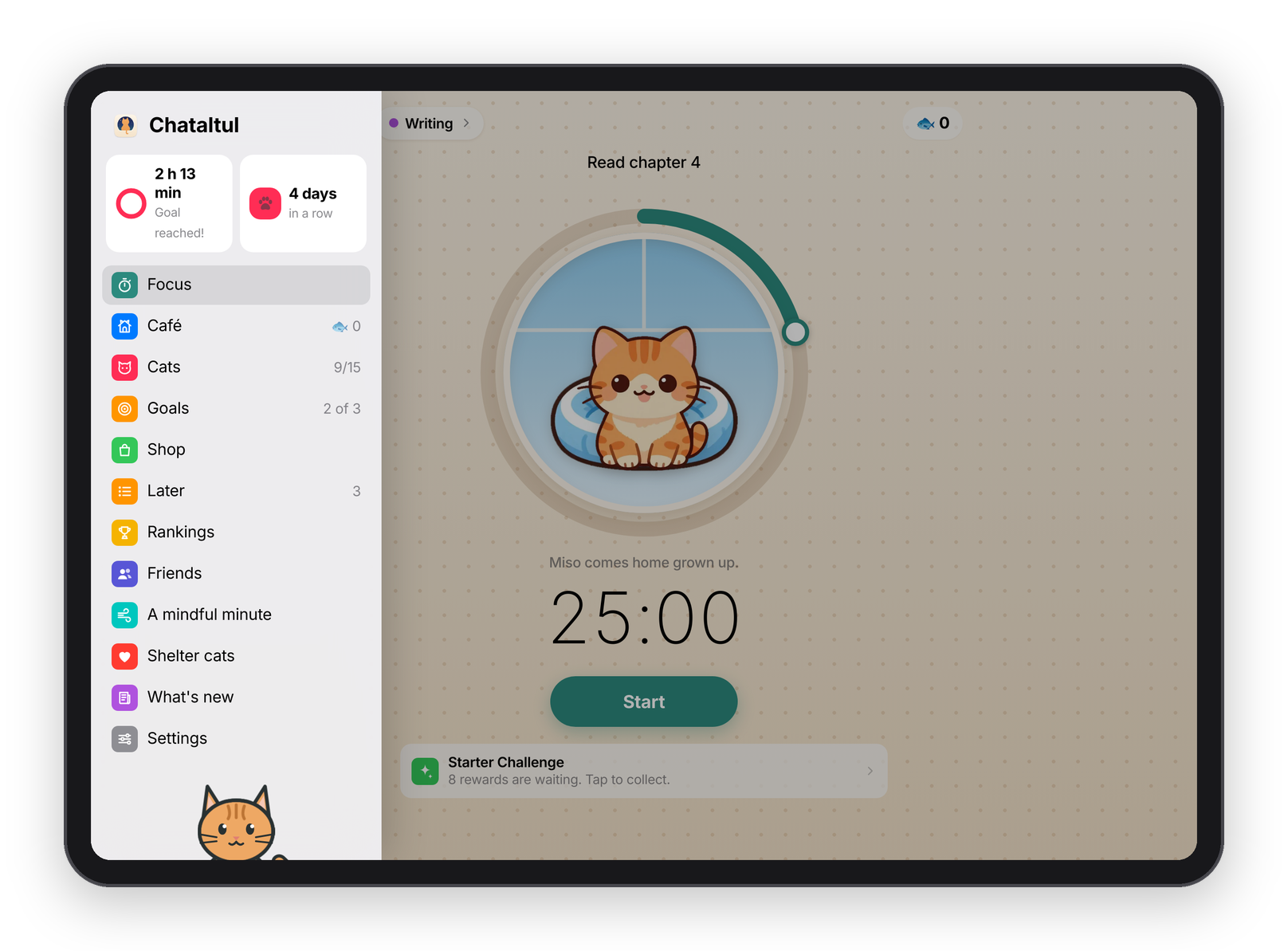
An iPad in landscape, with the menu open.
With a keyboard (an iPad with one, or a computer), ⌘1 to ⌘5 go to Focus, Later, Café, Cats and Settings, ⌘, opens Settings, the space bar pauses and resumes a block, N jumps to the title, and Esc closes the menu or a sheet, or goes back.
Where your data lives
Chataltul runs in your browser, and everything you do is kept there, in the browser's own storage. You don't need an account. If you turn on reminders, the server holds your device's next few pings so it can send them while the app is closed, and it deletes each one once it's sent. If you make an account, your data is also kept on the server, which backs it up and syncs it between your devices. Accounts and privacy has the details, including the usage counts and how to turn them off.
What works where
| iPhone or iPad, Home Screen app | iPhone or iPad, Safari tab | Android | A computer | |
|---|---|---|---|---|
| Blocks, check-ins in the app, Later, the Café | yes | yes | yes | yes |
| Reminders while the app is closed | yes (iOS and iPadOS 16.4 or newer) | no, Apple only allows them in the Home Screen app | yes, in Chrome or installed | yes, in browsers that do web notifications |
| Yes / Drifted on the notification itself | no, a tap opens Chataltul and it asks there | yes | depends on the browser | |
| The cat's picture in the notification | no, the title gets a 🐱 | yes | depends on the browser | |
| Keep the screen on | if the device allows it | if the device allows it | if the device allows it | if the browser allows it |
| An account, sync, friends | yes | yes | yes | yes |
| Blocking sites during a block | no | no | no | with the browser extension, in Chrome, Edge, Brave or Firefox |
One thing to know about iPhones and iPads: the Home Screen app keeps its own data, separate from Safari. If you used Chataltul in Safari first, sign in to your account in the Home Screen app and everything comes along. Without an account, the two start separately.
Settings, in one place
Settings is the last tab, and it's laid out like the Settings app:
- Your account, at the top: Sign In, with your email and a code Chataltul emails you (it makes the account the first time), or with a name and password. Once you're signed in, it has your name, your Email and Password (add or change either one), your username, Sign Out and Delete My Account.
- Focus: Daily goal, Check in every (10 to 60 minutes, or Only at the end), Cat mode, Next kitten, which takes you to the Cats tab, Tags, Pausing (up to 5 minutes, or off), Count extra time, Closing Chataltul counts as leaving, Block sites while you focus (on a computer, which says On once the browser extension is installed and opens its guide), Your own lines (for "Nudge me") and Café theme.
- Daily reminder: Remind me to start a block, at a time and on the days you pick.
- Focus with friends: Friends opens what you share, the name they see, your friend code, and your friends.
- Notifications: whether reminders are on for this device, Turn On or Test, and Chime when Chataltul is open.
- Privacy: what's kept where, and Share anonymous usage counts.
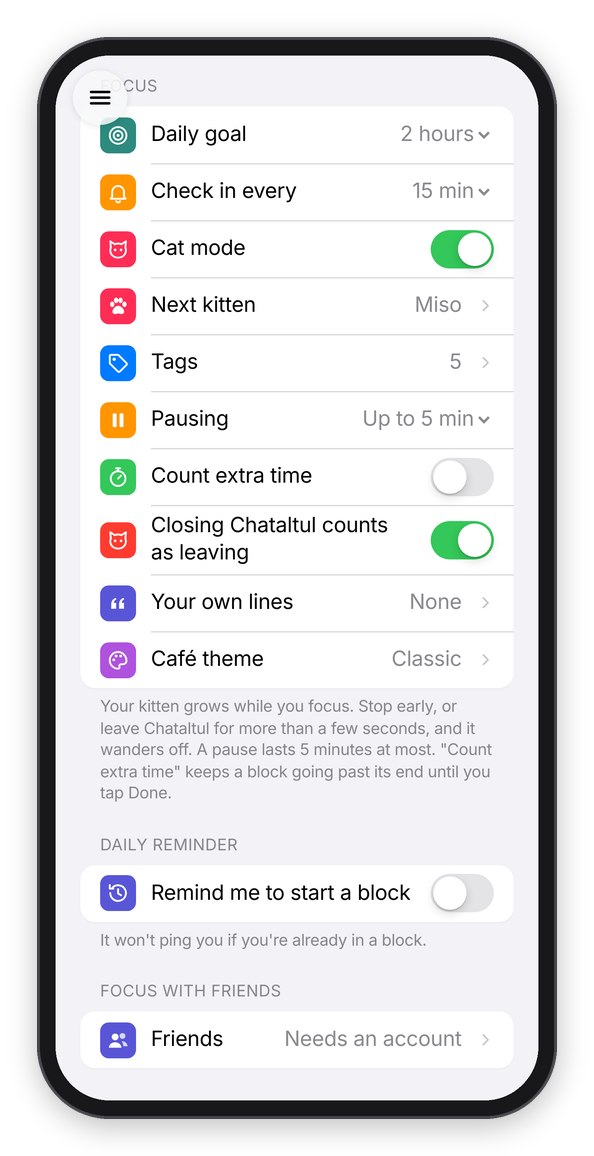
Settings.
What it isn't
Chataltul doesn't block apps or websites the way Forest's Deep Focus does. A web app can't, and honestly that's not what it's for: it's there to help you notice, not to lock the door (the kitten wandering off is about as strict as it gets). It's a small project I made and run myself, it's free, and there's nothing to buy with real money.
Next step
If you want to try it, Install gets it onto your phone, iPad or computer, with the reminders on.