Accounts and privacy
Chataltul keeps your data in your browser, and this page says exactly what leaves it and when: the reminders, an account if you make one, and the usage counts. Basically, the server only does the parts a browser can't do by itself, and it never gets more than those parts need.
Without an account
Everything you do stays in your browser's own storage: your blocks (what you worked on, the first step, the times, your check-in answers and what pulled you away, the thoughts you parked, how it went), your Later list and your settings. An answer you tap on a notification waits in the browser too, until Chataltul opens and picks it up. There's no cookie and no sign-in. The page itself loads nothing from anywhere else, no fonts, no scripts and no trackers.
Two things can go to the server, and you control both:
- Reminders, if you turn them on (see below).
- Usage counts, unless you turn them off (see the last section).
Reminders
A browser can't wake itself up to send you a check-in, so when you turn on reminders, the server keeps:
- this device's push address, which is an address at your browser's push service (Apple, Google, Mozilla or Microsoft), with its keys, under a random id;
- the next few pings for the block you're in: when each one is due, and its text. The text includes what you're working on, because that's what the notification says ("Still on: Draft the newsletter?"). Each ping is deleted once it's sent;
- your daily reminder, if it's on: the time, the days, your time zone and its text, which can be the top thing on your Later list.
The notifications are encrypted for your browser before they leave the server, so the push service carries them without being able to read them. If the browser drops its push subscription, for example when you block notifications for Chataltul, the next time Chataltul opens it tells the server to forget the device, and the server also forgets any device the push service says is gone.
With an account
An account is for a backup, for using Chataltul on more than one device, and for friends. You can make one with just your email: Chataltul emails you a 6-digit code, you type it in, and that's the account, with no password to remember. Or you can make one with a name and a password, like before. When you make one, what was in your browser comes along into it. The server keeps, in one file per account:
- your name, and your password if you set one, stored as a scrypt hash, never the password itself;
- your email, if you signed up with it or added it. It's only used to send you sign-in codes, and a code to make sure it's you when an account without a password is deleted. Nothing else ever goes to it: no newsletters, no reminders, no "we miss you";
- your friend code and who your friends are;
- your sign-ins, each a random token kept only as a hash. The browser holds it in a cookie that lasts 400 days and is renewed when you use the app;
- the same data your browser keeps: blocks, Later and settings, including your time zone, what you share with friends and the name they see. This is what syncs between your devices;
- which of your devices have reminders on;
- while you nap together, who's in the group, which kitten each of you brought, when each of you started, and whether someone left or stopped, plus the room's code if you made one. Each group is deleted 12 hours after it ends.
If you join the rankings, the server works out this week's minutes and kittens from your synced data, and shows them to your friends who are in the rankings too. If you also choose Worldwide, it shows them to everyone under the nickname you picked, and never your account name. Turning the rankings off takes you out right away.
The codes come from support@tiresia.xyz, which is my Proton Mail address, so they travel like any other email I send. Each code works for 10 minutes and five tries, and the server keeps only a hash of it, in memory, so it's gone once it's used or the server restarts. If you didn't ask for a code, you can ignore the email: nobody gets in without it. When you sign up with your email, your account gets a name from the part before the @ (with a number on the end if someone has it already). Your friends see that name unless you pick another one in Settings → Friends, and Settings → Account shows it as your username.
Your friends only ever see what Focus with friends says they see: the block you're in now, at the level you chose, and never your history, notes, parked thoughts or check-ins. With rankings on, they also see your week's minutes and kittens. When anyone sponsors a shelter cat, the server adds one to a single number for everybody, with nothing about who did it; your friends' count comes from their own synced data.
Sign Out (tap your name at the top of Settings) removes the account's data from that browser, and it's still safe in the account. Delete My Account asks for your password (or, if you never set one, for a code Chataltul emails you) and then removes the account from the server, your email included: your sign-ins, your synced data, your pending pings and daily reminder, and you from your friends' lists. What's in your browser stays there, and a device that had reminders on keeps them as a device without an account.
The browser extension
If you install the browser extension, it keeps three things in the browser's storage for the extension, on your computer: your list of sites, Chataltul's address, and the block that's running (when it ends, what you're working on and the kitten). It gets those from the Chataltul page and from you, it never reads the other pages you visit, and it doesn't send anything anywhere. Removing it removes all of it.
The usage counts
Chataltul counts which features get used, so I can tell what's useful and what isn't. It's counts only, NEVER anything you type. What it sends is the name of the thing that happened, like "a block started", "a check-in was answered" or "a thought was parked", with a small detail where it helps: the block length you picked (5, 25, 50 or custom) and how many minutes it lasted, Ask me or Nudge me, Done, Partly or Not really, which "What pulled you away?" choice you tapped (like "Phone"), which sound, which cat you invited and whether the block had a tag (yes or no, never the tag itself), what you bought or adopted in the shop, that a kitten wandered off because you left the app, what kind of device it's on (an iPhone or iPad app, Android, a computer), and whether you're signed in.
Along with the counts goes a random id that your browser makes up the first time, so a returning browser can be told apart from a new one. It isn't your account and isn't tied to it. The server adds the counts up per day, keeps which ids were seen on which day, and keeps that for 120 days. It also counts a few things on its own side, like sign-ups and notifications sent, without any id.
Chataltul's server only uses your IP address in memory, to limit how many sign-ups, sign-ins and requests come from one place, and never writes it down.
To stop the counts, turn off Settings → Privacy → Share anonymous usage counts. Chataltul sends what was already waiting, with one last count saying counting was turned off, and nothing after that from this browser.
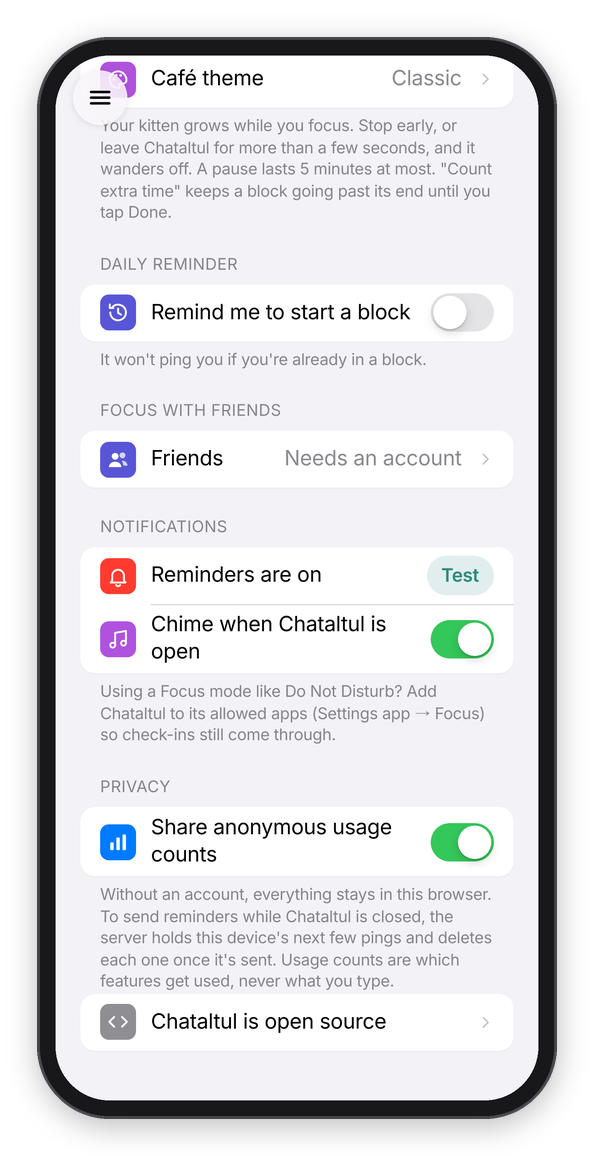
Settings → Privacy.
If you run your own server, all of this lives in your own state folder instead, and nobody else sees any of it. See Your own server.