Style sheets and client styles
This page is about the two things Translit keeps for after the job: the style sheet you hand to the client, and the client style that remembers their choices for next time.
The style sheet
An editor's style sheet is the list of decisions made on a manuscript, kept so that the next person (or the next book) spells things the same way. The Style sheet screen makes one from your text: every term it found, in the spelling you chose, with the plural, the Hebrew and a short meaning, set out alphabetically in boxes the way style sheets have always been laid out.
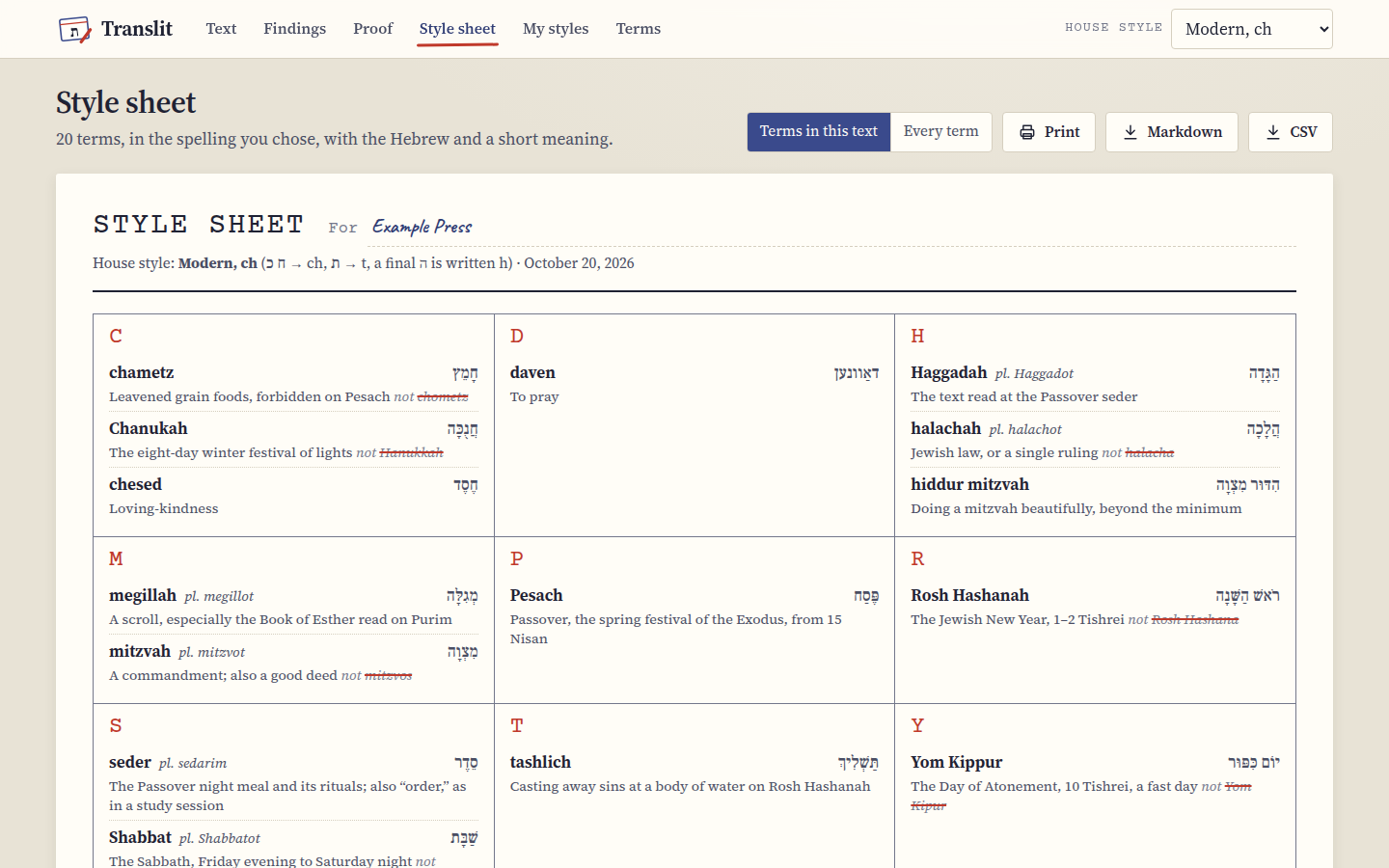 Each entry has the spelling to use, the plural, the Hebrew, a short meaning and what it replaced.
Where the text had other spellings, the entry ends with "not" and the old ones struck through, so the client can see at a glance that it's halachah and not halacha. Type the client's name, or the book or the show, next to For at the top and it goes on the sheet and into the file names.
Terms in this text is the default. Every term lists the whole term list in your house style instead, with your choices and your own terms in it, which makes a good general style sheet for a client before the first job even starts.
Printing it and sending it
Print prints just the sheet, in black on white, without the buttons and the rest of the page. In the print dialog you can also choose to save it as a PDF.
Markdown downloads the sheet as a table in a Markdown file, which pastes nicely into a wiki, a Google Doc or an email. CSV downloads it as a spreadsheet with a column each for the spelling, the plural, the Hebrew, the meaning, the old spellings and the group, which is the one to send when the client keeps their own list in Excel.
Client styles
Every choice you make on the Findings cards is a small change to the house style. Under My styles you can give those changes a name and keep them: type the client's name next to Save it as and press Save. From then on that style is "in use", its name shows at the top of every screen, and every change you make saves itself into it.
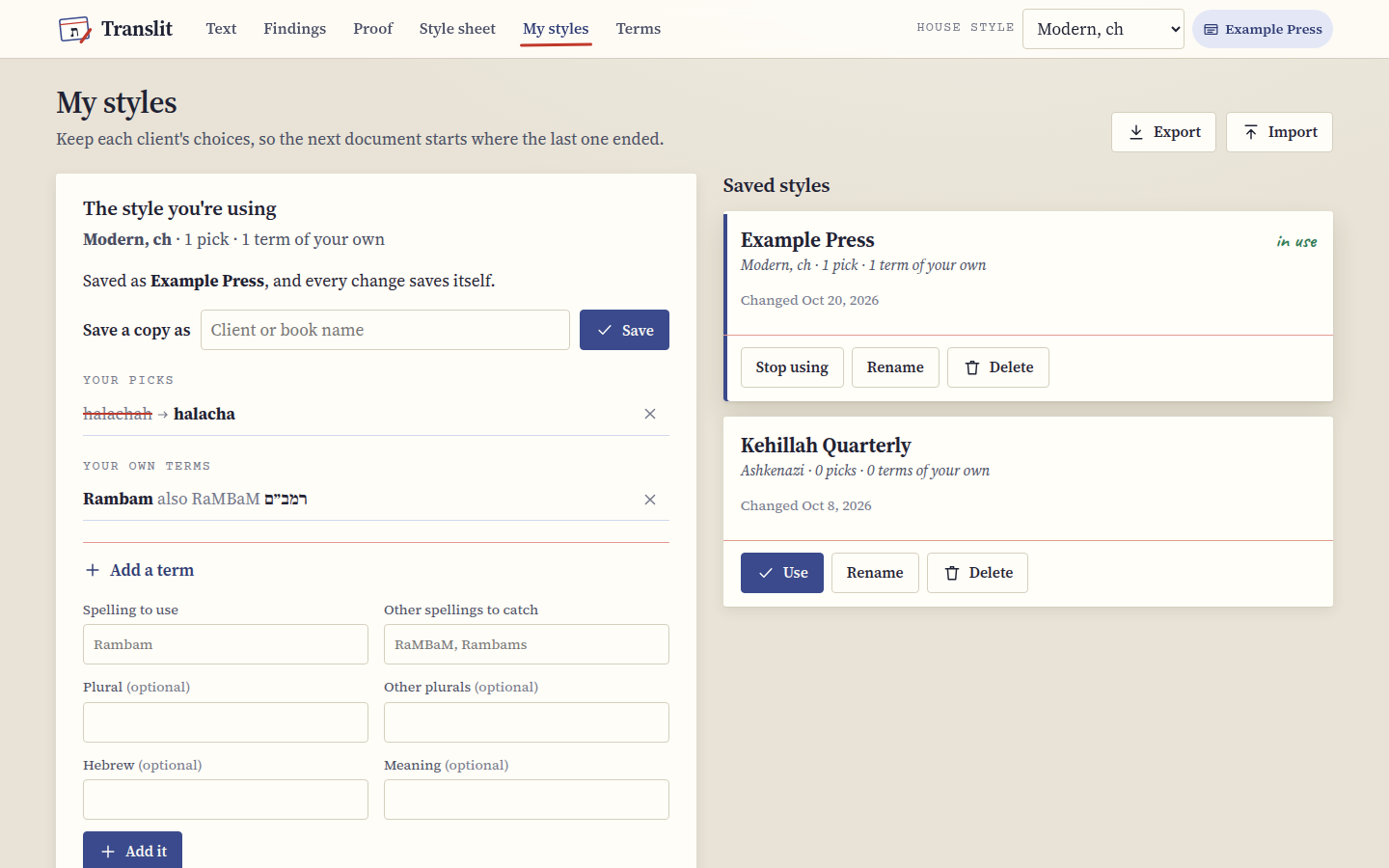 A client style is a house style, your picks for it, and any terms of your own.
The next time that client sends something, choose their style under "Client styles" on the Text screen (or press Use on its card here) and all of their choices come back at once: the house style, every pick, their own terms, and the capitals setting. Stop using leaves your choices as they are but stops saving them to that client, which is what you want before you experiment. Rename and Delete do what they say, and a deleted style has an Undo for a few seconds.
Under "Your picks" you can see every choice that differs from the house style, and the cross next to one puts that term back to the default. Save a copy as makes a new client style from the one you're using, which is the quickest way to set up a client who's almost like another.
Your own terms
The term list doesn't know every word, and it certainly doesn't know your client's rabbi or their favorite commentator. Under Add a term you can teach it one: the spelling to use, the other spellings to catch (with commas between them), and if you like a plural, the Hebrew and a meaning. Press Add it, and from then on it's checked like any other term, with its own card in Findings and its own entry on the style sheet. Your own terms belong to the style you're using, so one client's names don't turn up in another client's work.
If one of your spellings is also in the built-in list (say you want Moshiach to catch Mashiach), yours wins.
Moving your styles
Client styles live in your browser on this device. Export saves all of them to a small JSON file, and Import on another computer (or after clearing the browser) reads it back. If a style in the file is already here (because it was exported from here), the copy from the file replaces it, and the rest are added. It's worth exporting once in a while anyway, as a backup.
Next step
If you're curious why a term is spelled the way it is in a given style, or which words Translit leaves alone on purpose, The house styles and the terms has it all.