Settings
The gear at the top of every page opens Settings. Everything here is for your own account, except the last two parts, which only the owner sees.
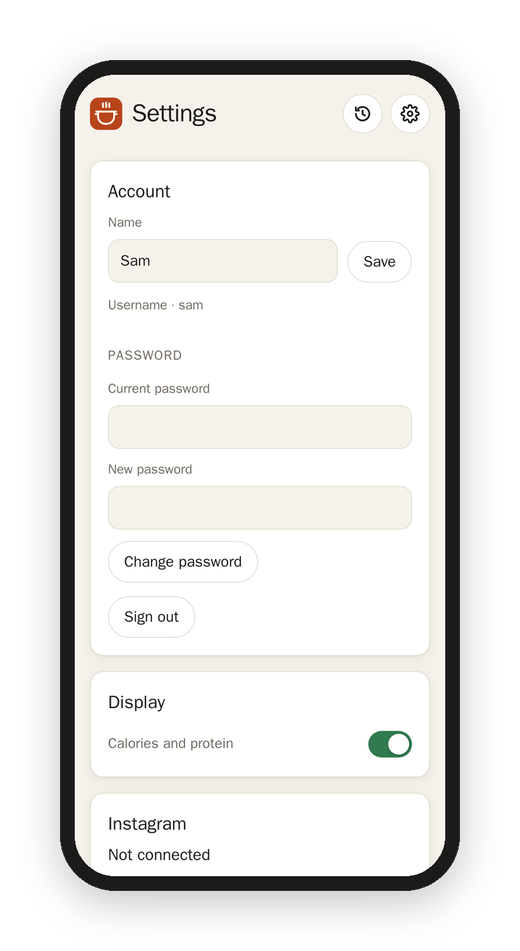
Account
- Name: how you show up to everyone else ("Added by Sara").
- Email: for signing in with it and for a forgotten password. A new email gets a 6-digit code first, to make sure it's yours.
- Password: your current one, then the new one. Changing it signs this account out on every other device.
- Sign out.
Display
- Calories and protein: off means you never see nutrition numbers on any recipe, even when the reel gives them. They're taken out before the recipe even reaches your device.
- Hebrew recipes in English: on means Hebrew recipes open in English, and their cards show the English names. The button on each recipe still switches back.
Instagram
This is how your own saved reels join the kitchen.
- Connect: give Matkon your Instagram sign-in as a
cookies.txtfile, from a browser that's signed in to Instagram. Any extension that exports cookies.txt will do; choose the file or paste what's in it, and tap Connect. - Find my collections: Matkon looks through your saved posts (it takes a minute or two) and lists your collections, each with a few of its captions so you can tell which one is the recipes. Instagram doesn't hand out collection names anymore, which is why it shows captions.
- Tap your recipe collection to pick it. From then on the hourly run reads it with your sign-in, and its reels join the kitchen with your name on them.
If Instagram ever turns the sign-in away, this part says Sign-in lapsed and the home page says so too, and nothing new comes in until you connect again.
Add a reel
Paste the link of any Instagram reel and tap Add, even one that isn't in a collection. It shows up in the kitchen a few minutes later.
Kitchen (the owner)
- Check Instagram: off stops everything that asks Instagram for anything (the hourly run, Check now, Add a reel, Find my collections) until you turn it back on. It's for when Instagram is being touchy about your sign-in and you'd rather it heard nothing from Matkon for a while. The recipes already in come along as usual.
- Check now: reads the collections right away, instead of waiting for the hour.
- Pages each hour: how many pages of newest saves an hourly run looks at (21 posts a page).
- Every save, every (hours): how often a run looks through every saved post, for an old save moved into a collection (168 is once a week).
- Reels each run: how many reels a run works through at most.
- Notes folder, Photos folder, Note tag: where the Obsidian notes go, and a tag for them. See Obsidian notes.
- App address: Matkon's own address, for the link in each note and in invites.
Accounts (the owner)
Everyone's accounts, with a new password or a bin for each, Invite by email, and New account by hand. See Accounts and invites.
Next: From reel to recipe